Video Dubbing With Voice Cloning: How It Works
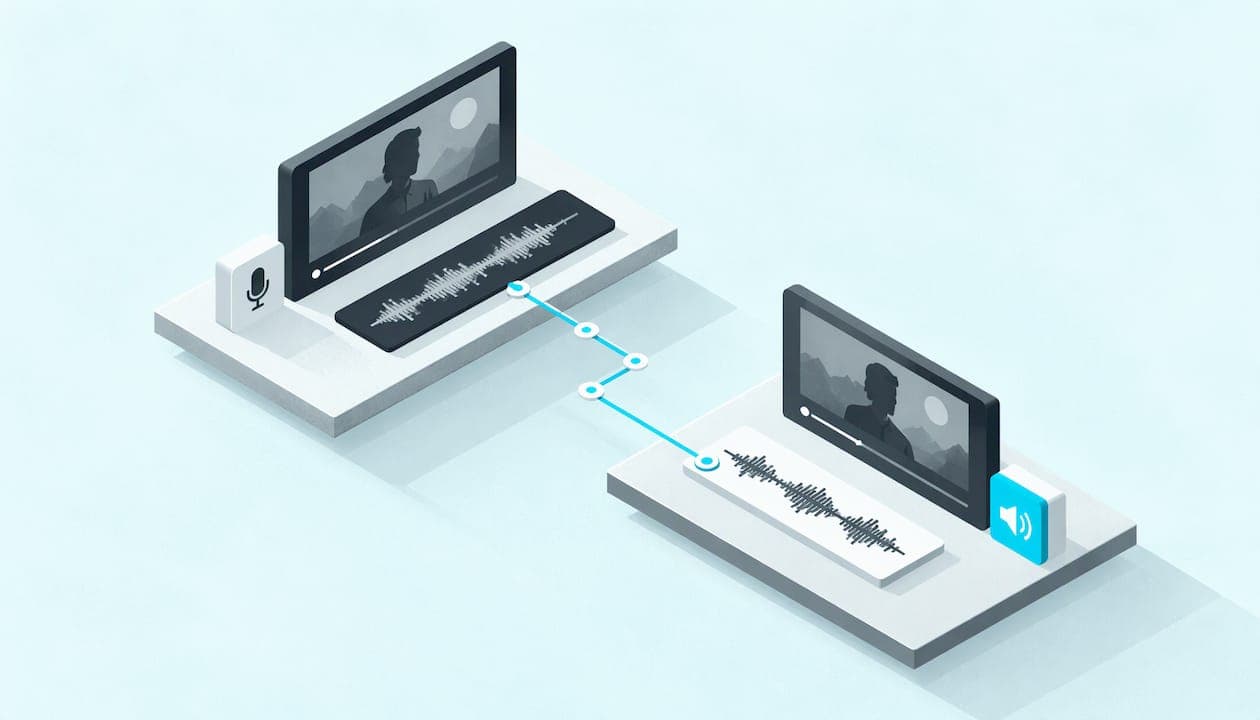
Video dubbing with voice cloning replaces the audio of your video with a translated track that still sounds like you. Your students, customers or followers hear the same speaker in their own language, not a generic narrator. We built DubEnvoy for this: it translates and dubs video into more than 50 languages while preserving the speaker’s voice, tone and emotion, and it delivers results in minutes.
This guide covers what the technology does, the steps behind it, what decides whether the result sounds natural, and how to use cloned voices responsibly. It is written for educators, businesses, creators and marketers who want to publish in more languages without re-recording anything.
TL;DR
- Voice cloning dubbing translates your script, generates speech in the new language in a voice modeled on yours, then syncs and mixes it back into the video.
- Quality depends on clean source audio, a reviewed translation, timing that fits the original pace, and how well each speaker’s voice is kept distinct.
- Dubbed formats can lower viewers’ mental effort and improve immersion compared with subtitles, according to a 2025 study of 36 participants.
- Get written consent before cloning any voice, label synthetic audio, and have a person check the translation before you publish.
- DubEnvoy plans start at $4.99 per week, $19.99 per month or $34.99 per month for Dub Pro.
Table of Contents
- What video dubbing with voice cloning actually is
- How the voice, tone and emotion carry over
- The steps behind a dubbed video
- What decides whether a dub sounds good
- Who benefits most
- Consent, labeling and privacy
- Start with DubEnvoy
- Where this is heading
- FAQ
- Sources
What video dubbing with voice cloning actually is
Traditional dubbing is a three-part job: translating the script, recording voice actors, and mixing the new audio with the picture. A 2023 technology review in Frontiers in Signal Processing describes professional actors aligning the translated text with the original actors’ facial movements and expressions. In automated dubbing, text-to-speech takes the actor’s place, ideally tuned to the original speaker’s voice.
That last phrase is voice cloning. A model learns the characteristics of a speaker from their recording, then speaks translated sentences with those characteristics. The viewer hears a Spanish or Hindi version of your own voice.
Three formats get confused, so here is the difference:
| Format | What the viewer gets | Voice | Best for |
|---|---|---|---|
| Subtitles | Translated text on screen | Original audio | Quick accessibility |
| Standard dubbing | Translated audio track | A different voice | Broad entertainment content |
| Dubbing with voice cloning | Translated audio track | Your own voice, in another language | Teachers, founders, creators and brands whose identity is their voice |
The format matters for learning and engagement. In the GlobalizeEd study of 36 participants, dubbed formats reduced reported cognitive load and improved immersion compared with traditional subtitles, while learning effectiveness matched high-quality subtitles. For an educator, that means students can follow the lesson without splitting attention between reading and watching.
How the voice, tone and emotion carry over
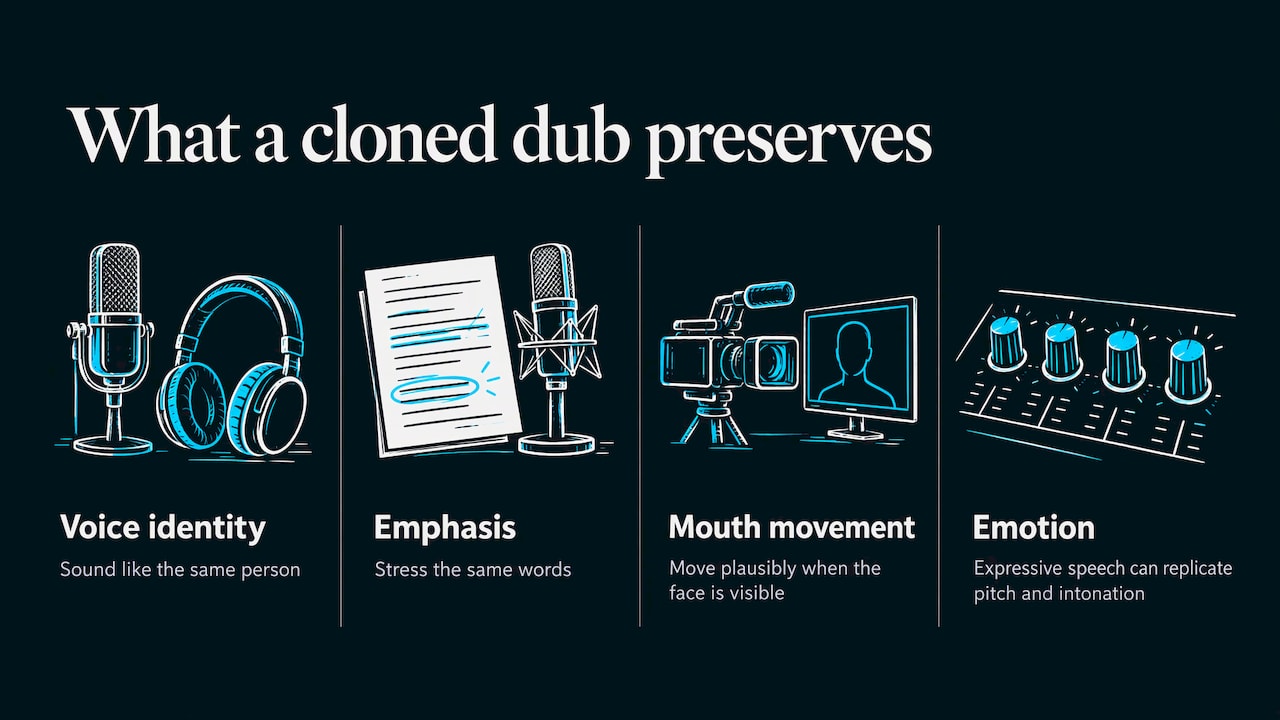
A cloned dub has to do three separate things at once. It has to sound like the same person, stress the same words, and, if the face is visible, move the mouth plausibly. The Face-Dubbing++ research team treats voice identity, emphasis and mouth movement as separate technical components that must be deliberately recombined. That is why a cheap text-to-speech voice laid over a video feels flat: it handles the words but drops the delivery.
Emotion is the hardest part. Platforms are working on it too. YouTube’s help page notes that some languages support expressive speech, which replicates the original speaker’s pitch and intonation for more natural-sounding dubs. Our own workflow is designed around the same goal: keeping the speaker’s voice, tone and emotion intact rather than swapping in a neutral voice.
The steps behind a dubbed video
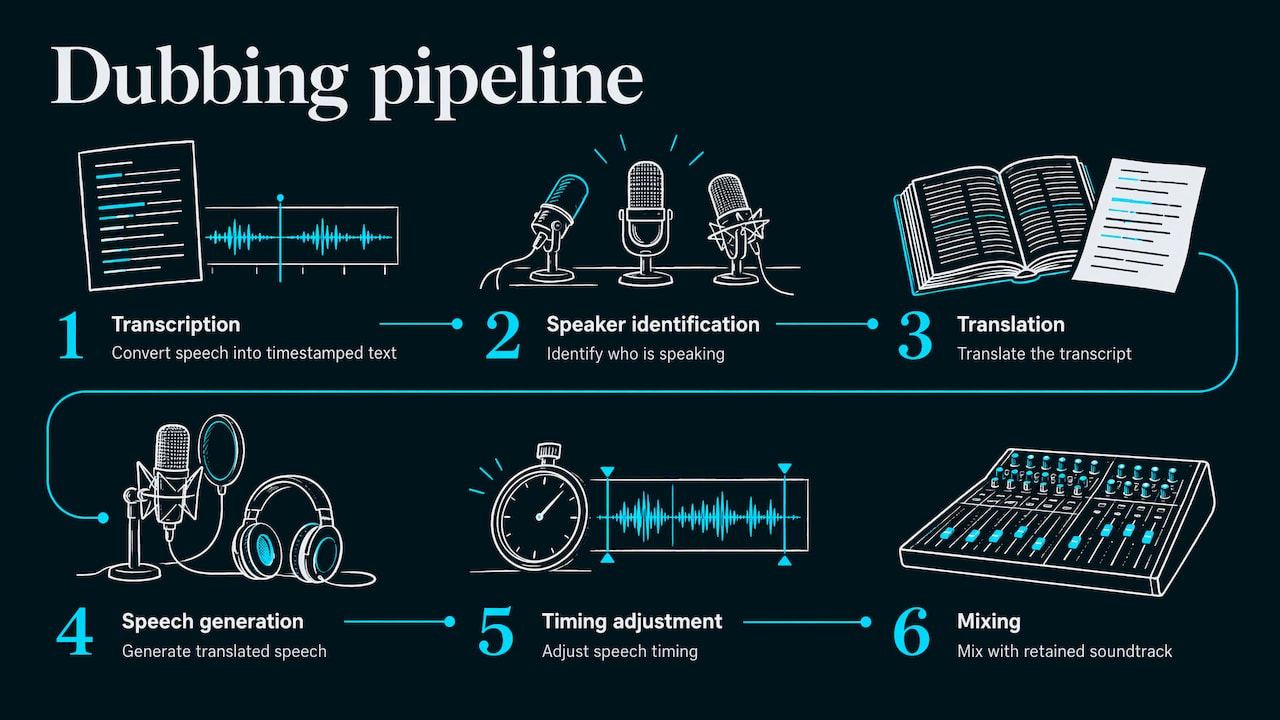
The pipeline is consistent across serious systems. Ultralytics’ glossary entry on AI dubbing lists transcription into timestamped text, speaker identification (diarization), translation, speech generation, timing adjustment and mixing with the retained soundtrack. Here is what each step takes from you and where it goes wrong.
1. Prepare the source audio
Upload the cleanest version of the video you have. Background music baked into the voice track, echo, and people talking over each other all make transcription and cloning harder. If you have a separate voice recording or a version without music, use it. A short test on a one-minute clip tells you more than a long guess.
2. Transcribe and identify speakers
The system turns speech into timed text and works out who is speaking. Errors here travel downstream: a misheard product name becomes a mistranslated product name. Read the transcript before moving on, especially names, numbers, acronyms and technical terms.
3. Translate with timing in mind
Machine translation can mistranslate, and the Frontiers review says an expert should review the translated script. There is a second constraint: the translation must fit the time the original speaker took, which Ultralytics calls isochrony. Some languages need more syllables than English for the same idea, so good dubbing tightens phrasing rather than just speeding up the voice.
If you teach or sell in a field with specialist vocabulary, build a short glossary of terms and check those first. A native speaker reading the script for ten minutes catches the errors that matter most.
4. Generate the cloned voice
The translated lines are spoken in a voice modeled on the original speaker. Single-speaker content such as a lecture or a product walkthrough is the simplest case. With panels, interviews or two-person demos, each speaker needs a distinct voice profile. The GlobalizeEd system, for example, can diarize multiple speakers and give each a separate profile.
5. Sync the audio and, if needed, the lips
Timing alignment and visual lip-sync are different things. Ultralytics explains that lip-sync coordinates visible mouth shapes with the generated speech, while timing adaptation, shorter translations and speech-rate adjustment fit the audio to the dialogue window. If the speaker is on camera in close-up, lip-sync matters. For screen recordings, slides and voice-over, timing alone is usually enough. We cover the on-camera case in detail in our guide to video translation with lip sync.
6. Mix and export
The new voice has to sit with the original music and effects at the right level. If you want to fine-tune it yourself, the principles of audio-video mixing, such as EQ, compression and reverb, apply to a dubbed voice as they do to any vocal. Then export the video or the separate audio track, plus subtitles if your audience wants both.
For audio-only content such as podcasts and courses, the same steps apply without the lip-sync stage. See our walkthrough of AI audio dubbing.
What decides whether a dub sounds good
It helps to know how researchers judge this, so you can judge your own results the same way. Slator’s 2025 review says cloned-voice dubbing should be assessed on naturalness, emotion, speaker similarity, audio clarity, and robustness across styles, accents, pronunciation, noise and long passages. Use those five as your listening checklist.
A 2026 University of Malta study by Giselle Spiteri Miggiani gives a useful reference point. Professional evaluators rated the AI dub 6.92 on average and the studio dub 7.31 on a 10-point scale, a gap of 0.39. Voice identity match was the AI dub’s highest-rated parameter, and timing was its lowest. The study also pinpointed where human review pays off: synchronization, voice consistency and expressiveness, narrative cohesion, sound design, and language and translation.
The practical lesson for you:
- Voice similarity is where cloning is strongest. That is the reason to choose it over a stock voice.
- Timing deserves your listening time. Check that sentences end when the speaker’s mouth stops and that pauses fall naturally.
- Content type changes results. Slator’s interview with a localization leader says success depends on content type, language and whether lip-sync is needed, and that expert review of the transcript, translation and synthesized speech can improve quality substantially.
A worked example
Say you run a 12-minute onboarding video for a software product, recorded in English by your head of customer success. You want Spanish, German and Portuguese versions.
- Upload the clean voice track and run the first language.
- Read the transcript against the audio. Fix two product names and one acronym.
- Have a Spanish-speaking colleague skim the translation and flag any phrase that sounds stiff.
- Listen to the first two minutes for similarity, pacing and clarity.
- If it passes, run German and Portuguese with the same corrected glossary.
The corrected terms carry across languages, so the second and third versions take a fraction of the effort of the first.
Who benefits most
Educators. Students keep the teacher’s voice and a sense of personal presence, and the GlobalizeEd findings point to lower cognitive load than subtitles. A semester of recorded lectures can reach international students in their first language.
Businesses entering new markets. Training, product demos and sales videos stay consistent across regions, with the same trusted voice and no studio booking per language.
Creators. A channel can add language tracks without recording again. Our guide on how to dub YouTube videos covers the creator workflow. YouTube also offers its own automatic dubbing, with eligibility rules and language lists on its help page.
Marketers. Campaign videos can be localized per market while the spokesperson’s voice stays recognizable, which supports brand consistency.
Consent, labeling and privacy
A cloned voice is a person’s identity, so treat it that way. The 2026 DEG white paper on generative AI and synthetic media frames voices and likenesses around consent, compensation and control. It points to transparency, clear agreements and provenance tools, and says human oversight stays essential for cultural nuance, performance quality and bias control. It also recommends a human-in-the-loop localization workflow: transcript review, translation, synthetic voice creation, audio-visual synchronization and final quality assurance.
Turn that into a routine:
- Clone only voices you have permission to use. Your own, or a speaker who has agreed in writing. A KAGAMI Academy tutorial recommends written consent before voice cloning or face alteration.
- Say where the audio is synthetic. A line in the description or an on-screen note is enough for most uses. The same tutorial recommends clear labeling of synthetic content.
- Have a person check the translation. This protects accuracy and cultural fit, and it protects the speaker’s reputation.
- Agree the scope with guest speakers. If a customer or colleague appears in your video, confirm they are comfortable with their voice being dubbed.
On our side, the workflow is designed with voice and media privacy safeguards, so your uploads are handled with care.
Start with DubEnvoy
DubEnvoy is an AI dubbing studio for video and audio. It translates and dubs into more than 50 languages, clones the speaker’s voice, supports lip-syncing and generates subtitles. For larger needs there are mobile apps, developer APIs and enterprise integrations.
Plans are published on the pricing page:
- Weekly Dub Plan: $4.99 per week
- Monthly Dub Plan: $19.99 per month
- Monthly Dub Pro: $34.99 per month
- Enterprise & High Volume: custom, for API access, dedicated processing and high-volume integrations
The weekly plan suits a single project, such as one course module or one campaign. A monthly plan fits a regular publishing schedule. You can begin on the DubEnvoy homepage and dub your first clip in minutes.
Where this is heading
Research is moving toward tighter timing and better lip-sync. The PS-TTS study proposes matching translated utterance duration and phonetic patterns to improve lip-sync while balancing meaning, with tests in Korean, English and French. As these methods mature, the gap between a dub and the original keeps narrowing. The habits that matter now stay the same: clean source audio, a checked script, listening to the result, and clear consent.
FAQ
Does voice cloning dubbing sound like me in another language?
The cloned voice is modeled on your recording, so the timbre and general character carry over. In the University of Malta study, voice identity match was the AI dub’s highest-rated parameter. Delivery and pacing depend on the quality of your source audio and the translation.
Do I need subtitles if I dub my video?
Not required, but they help viewers who watch without sound and make the content searchable. Dubbing reduces the reading load, and subtitles add flexibility. DubEnvoy generates subtitles alongside the dub.
Can I dub a video with more than one speaker?
Yes. The system identifies each speaker and gives each a distinct voice profile. Clean audio with minimal overlapping speech gives the best separation, so check the first minute for voice consistency before running the full video.
Do I need permission to clone a voice?
Yes. Use your own voice or get written consent from the speaker, and label synthetic audio where viewers will hear it. The DEG white paper centers its guidance on consent, compensation and control.
How long does it take?
DubEnvoy is designed to deliver a dubbed video in minutes. Add time for your own review of the transcript and translation, which is where most quality gains come from.
Sources
- Multilingual video dubbing: a technology review (Frontiers in Signal Processing, 2023)
- GlobalizeEd: A Multimodal Translation System (arXiv, 2025)
- Face-Dubbing++: Lip-Synchronous, Voice Preserving Translation (arXiv, 2022)
- Use automatic dubbing (YouTube Help)
- AI Dubbing: Multilingual Video Localization (Ultralytics glossary, 2026)
- How Good is AI Voice Cloning for Dubbing? (Slator, 2025)
- Quality in interlingual AI dubbing (University of Malta, 2026)
- Generative AI and Synthetic Media white paper (DEG, 2026)
- Video Dubbing with Lip-Sync on GX10 (KAGAMI Academy, 2026)
- PS-TTS: Phonetic Synchronization in Text-to-Speech (arXiv, 2026)